Anthony Saviano
Point your agent at Soundbox
Soundbox's MCP tools hand your agent a file path on your own disk, and connecting one takes a single line of config.
Updated

Say you're building a game, an app or a video that needs sound, and an agent is already writing the code. Getting the sound usually means a browser tab, an account and a downloads folder. This post shows how to let the agent get it from Soundbox instead, with one line of config.
It covers connecting a client, what the tools return, and why the stdio bridge works the way it does. It doesn't cover the HTTP API in detail (see docs/API.md), the voice and story tools, or which model to pick.
The one line
The MCP server runs inside the main Soundbox process at
http://127.0.0.1:17494/mcp. There's no separate daemon. If the app is
running, the server is up. In Claude Code it's one command:
claude mcp add --transport http soundbox http://127.0.0.1:17494/mcpIn anything that takes a JSON config file:
{
  "mcpServers": {
    "soundbox": { "type": "http", "url": "http://127.0.0.1:17494/mcp" }
  }
}
There's no trailing slash. Soundbox maps /mcp to the mounted path internally
instead of replying with a 307, because many clients drop a redirect on a POST
without saying so. The URL above works as pasted.
Over HTTP the agent's side needs nothing installed: no key, no account, no
binary on PATH. There's no auth, and no Python. The server is TypeScript.
What audio.cpp replaced explains how it got
there.
What comes back is a path
Every result from soundbox.generate includes an absolute path to a WAV on
your disk. It isn't a base64 blob to decode, a signed URL that expires, or an
id the agent has to swap for bytes in a second call.
This matters once you watch an agent use it. With a path, the next step is
ffmpeg -i <path> ... or a copy into assets/audio/, which is ordinary shell
work agents already do well. With a payload, the agent has to write a decoder,
pick a temp directory, and hope the bytes survive its own context. The tool and
the agent are on the same machine, so they can share files.
The other tools work the same way. list_models returns commercial_use as
yes, no or conditional, so an agent on a commercial project can check
before it generates. generate blocks until the audio is on disk, which takes
from seconds to a minute depending on model and length. That's why the bridge's
request timeout is set much longer than you'd expect. Thirty seconds would cut
off real jobs.
Hosted studios
The usual way to get generated audio into a project is a hosted studio: one model, a subscription, and your audio stored on someone else's servers under their terms. That works. It also means a billing account, a model someone else chose, and nothing when you're offline.
Soundbox runs several models behind one interface on your own machine. It works offline once the weights are downloaded, with no account, no API key and no per-generation billing. Each model's licence is on its card before you download it, and Soundbox itself is MIT.
Because the audio, the model and the agent are all on your machine, the tool can return a file path. A hosted service can't do that.
The bridge doesn't load models
Some clients only speak stdio. The easy way to serve them would be a bridge
that loads models itself. Soundbox doesn't do that, and the header of
server/src/mcp/stdio.ts says why:
This does NOT load models. It is a thin proxy onto a running Soundbox server — one GPU, one process holding the weights. If the server isn't running, tools return an actionable error rather than silently starting a second copy.
A bridge that loaded models would put two copies of a diffusion model on one GPU: one in the app you have open and one in the bridge your editor started. Each thinks it owns the VRAM. The result is an out-of-memory error, and the agent only sees that its request for a sound failed. Soundbox keeps one model at a time on purpose, and a second process is the one way to break that from outside the app.
So the bridge proxies. When it can't reach the server, it tells the agent what
to do: start the server, or set SOUNDBOX_URL. It also reports its own calls
to the server, marked transport: stdio. Without that, the server would see
the bridge's HTTP requests but not the client behind them.
{
  "mcpServers": {
    "soundbox": {
      "command": "node",
      "args": ["/absolute/path/to/soundbox/server/dist/mcp/stdio.js"]
    }
  }
}
Use the absolute path. The shorter names don't resolve: soundbox-mcp is a
private package, so npx returns a 404, and the bare command is only linked
into the checkout's own node_modules/.bin, which isn't on the PATH an
editor uses to start an MCP server. Until recently, five places in this repo
described launching the bridge in three different ways, and all five were
wrong. Two pointed at a backend/ directory that was deleted when the server
moved to TypeScript, two said to npx the private package, and one gave the
bare command. If your client speaks HTTP, use HTTP and skip the bridge.
Watching it work
The Agents page lists every client that has connected: what it called, whether
the call worked, how long it took, and the sounds it made. Attribution needs no
setup. MCP's clientInfo handshake carries the agent's name and version, so
its sounds are tagged with it and the Library can filter by it.
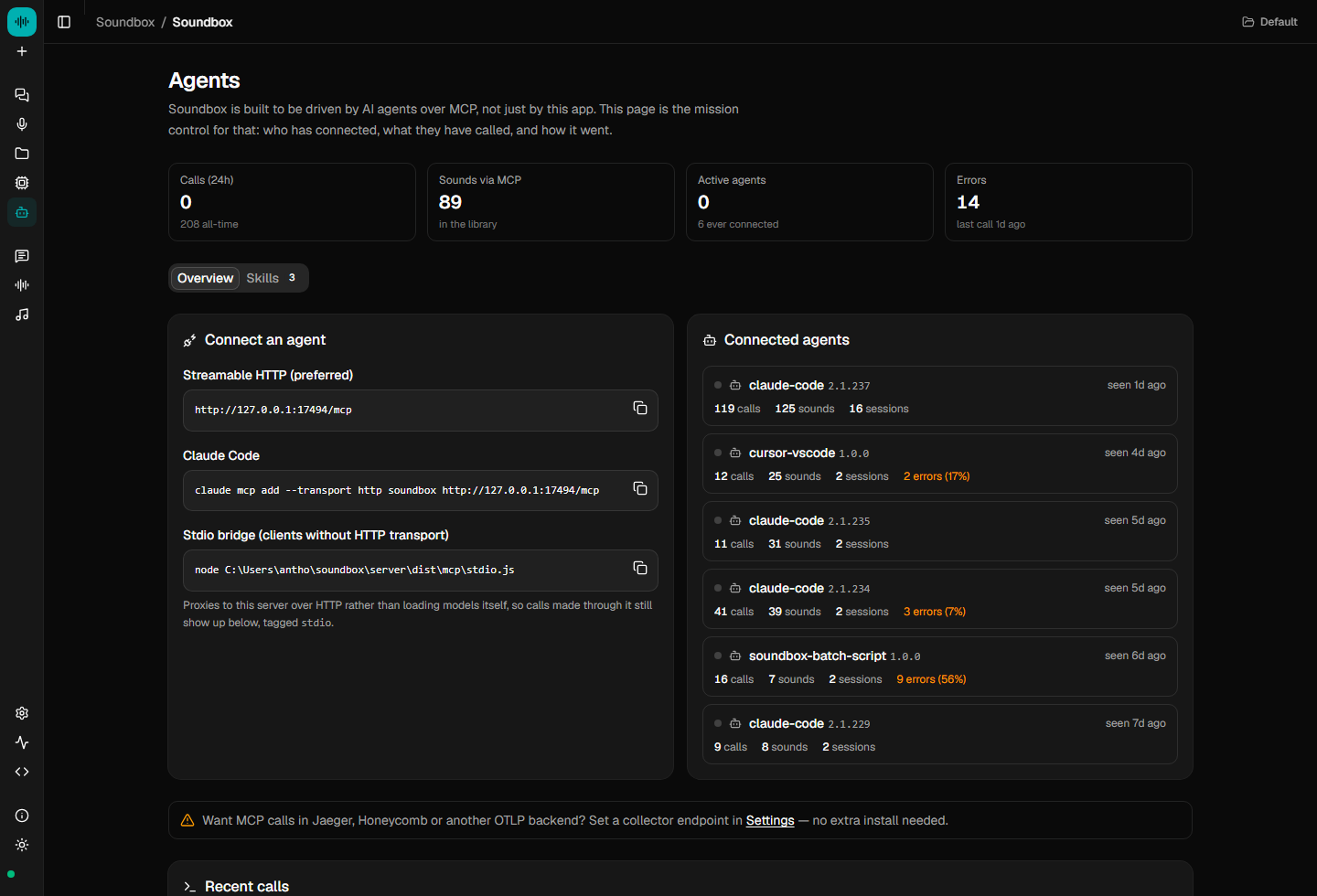
The page also prints the stdio config with the path filled in for the running install, so you can copy it from there and know it's current.
Skills ship in server/skills/. soundbox-sfx covers prompting and tool use.
soundbox-sound-pass lists every sound event a project needs and generates
them. They exist because these models respond to material, action and space,
like "low metallic groan of a ship's hull under pressure", rather than mood
words. Without the skill, an agent learns that by trial and error on your GPU.
soundbox skills install                  # -> ~/.claude/skills/
soundbox skills install --target cursor  # -> ~/.cursor/skills/
You can also install them with one click on the Agents page.
The full tool reference, speech delivery options and OpenTelemetry export are in docs/MCP.md. Start the server, add the line, and ask for a door sound.